


A real light leak is a physical event. Chemistry or optics went wrong on a strip of film: a sprocket gap sat open, a roll got exposed at the wrong end, a darkroom door swung before the print was safe. That accident leaves marks you can read. The burn is lopsided, it hugs the edge of the frame and the sprocket holes, the dust sits at a specific depth inside the grain, and the colour shift comes from the film base being exposed and processed, so it moves the way a chemical reaction moves. A generated filter flattens all of that into an even gradient with noise dropped on top, repeatable and symmetrical, which is why it reads fake the moment you push it over a real photograph.
Search "light leak overlay" right now and you get 4K stock reels for video editors and one-click film-burn apps built for phone edits. None of them talk to a designer dropping a leak onto a still image for print or brand work. So here are five overlay and effect sets built from real scanned or archived film damage, chosen for how they hold up in client work, on album covers, in lookbooks, across posters and product shots, and not just how they pop in a preview thumbnail.
Old Film Burn Overlay Bundle by Pixelbuddha
Twenty-two frames scanned straight off burnt 35mm stock, plus a high-resolution PSD, at 4500x3000 and 3000x4500, 300dpi. The Old Film Burn Overlay Bundle runs orange and red across the frame with dust speckles, scratch streaks, and half-printed edge markings that ride the film border where the roll ended. The burns span the full range: soft warm glows at one end, hard red bleeds at the other, with a few light-trail squiggles from the film advancing past an open shutter. Those squiggles are the tell, coming straight from the mechanics of a camera moving past an open shutter, a shape no rendered filter sets out to draw.

Drop the blend mode to Screen and the black falls away, leaving only the leak sitting over your image. Stack two files if you want a heavier burn without losing the asymmetry. It suits a moody album cover or an editorial spread needing warmth with real history behind it, and the frames also work as standalone warm-toned backgrounds when the whole surface needs to feel aged.
Golden Hour: Light Leak Overlays by Pixelbuddha
The flare that catches your lens at the end of the day, the one every photographer chases and nobody plans, is what Golden Hour: Light Leak Overlays bottles. Twenty warm-toned leaks and lens flares, shipped as JPG and layered PSD at 4500x3000, running deep amber and orange blooms with white-hot cores and a thin rainbow fringe of chromatic dispersion along the brightest edge, all sitting over fine film grain. That fringe is optical dispersion doing its job through real glass, which is the detail a rendered flare always gets slightly wrong.

Screen, Lighten, or Linear Dodge over a dark frame will bring the bloom up cleanly. If the core reads too hot, the layered PSD lets you mask it back by hand and tune the colour spill manually rather than settling for the frame flat. Warm a product or apparel shot with it, lay sunlit haze over a portrait, or push a travel and lifestyle series toward that late-afternoon feeling. It pairs well with clean backgrounds too, and if you work that way often, we've got plenty more textures to dig through.
Rainbow Leaks Texture Collection by Pixelbuddha
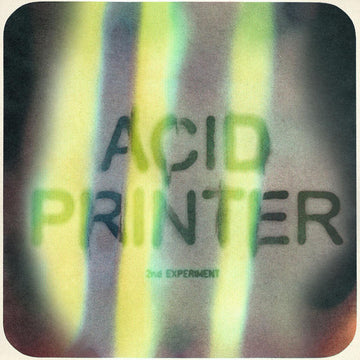
For the projects where subtle is the wrong answer, the Rainbow Leaks Texture Collection carries a full spectral spread in every frame: red bleeding into yellow into cyan into violet, with film grain sitting on top. High-quality PSD plus 19 JPG files at 4500x3000, 300dpi. The shapes go from tight diagonal beams cutting corner to corner to wide flooding arcs that swallow the whole frame. It is the boldest and most saturated of the five, a leak built to dominate the composition.

Music campaigns, festival identity work, streetwear brand visuals, and gig flyers are where this earns its keep, work where the leak carries the whole design. It holds up across sport editorial, zine spreads, and album artwork too, and it sits nicely next to the kind of clean loops we covered in our piece on aesthetic gradient backgrounds that loop clean behind real footage when you need one static hero and one moving version of the same energy.
30 Light Leaks by Studio Dusk
Every so often a job needs a light leak in the next twenty minutes and needs options, and that is the gap 30 Light Leaks by Studio Dusk fills. Thirty high-resolution JPEGs at 4K, 3840x2160, plus one organised PSD with all thirty arranged together for quick pulling. It is a staff select and the best-seller of this group, backed by real sales and add-to-cart numbers.

The set is broad on purpose: thirty different moods spanning vintage, dreamy, and cinematic looks, built for range across social content, editorial, and posters. Screen mode across the board, swap frames until one sits right, done. It earns a permanent spot in the working folder, the one that answers "I need a leak now" without forcing a commitment to a single look.
Darkroom - Analog Photo Toolkit by MiksKS
Darkroom by MiksKS is the odd one out here, and worth the detour. It is a full toolkit for recreating early 20th-century print and film processing digitally, built using film grain pulled from historical photo archives: grain with a real photographic source behind it. That provenance is the point, the grain carrying the irregularities that light and chemistry leave behind on a physical negative.

Inside there is a one-click Photoshop script offering 15 photo effects that auto-scale to any image's dimensions, with four size presets from Fine to XL to control grain and crispness. The workflow is non-destructive, generating editable adjustment layers and smart filters that keep every decision open long after the first pass. The same 15 effects also come as PSDT templates at 3000x3000, 300dpi for manual layer-based work, plus 90 PNG photo frames and a Photoshop Action launcher for fast access. Reach for this when a whole batch of images needs the same darkroom-era treatment applied consistently across every frame: grain, print texture, and framing all handled together. If you like your grain sourced from real material, our write-up on paper and print textures that actually feel physical runs on the same principle.
Why real provenance wins
Film is having a proper resurgence, everyone shooting rolls and instant packs again, at the same moment the top of every search result fills with apps generating fake film damage on demand. Those synthetic burns are cheap to make and easy to spot, because they smooth out the asymmetry, the sprocket-edge bleed, and the depth of the dust that only exist because something physical went wrong on a real strip of film. Provenance is the harder thing to fake, and it is the reason these five are worth paying for.