


Portrait Blur Photo Effect

Sko4
Description
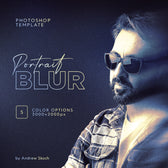
Create stunning, dynamic portraits with this Photoshop template featuring a smooth motion blur effect. Includes 5 color options to match different moods and styles. High-resolution (3000×2000px) and easy to customize with smart object layers for quick results.
Perfect for portrait photography, fashion images, social media visuals, lifestyle shots, and editorial designs, the effect enhances subject separation and adds a polished, high-end feel without complex manual masking.
Built with a Smart Object workflow, the effect is easy to apply and fully editable, allowing you to achieve realistic blur results in just a few clicks.
Features:
- PSD template (3000×2000 px)
- 5 color variations with stylish gradients
- High-resolution and fully editable layers
- Easy to edit via smart object replacement
AI Overview
This Photoshop template applies a motion blur effect to portrait images using Smart Object layers, and includes 5 color variations. The file is provided in PSD format at 3000×2000px resolution with fully editable layers.
What's Included
Compatibility

File Size: 64.6MB
DPI: 300
Dimensions: 3000x2000px
Uploaded: October 16, 2026


Instant
Download

Premium
Quality

Lifetime
Support
 Frequently Asked Questions
We want you to be happy with your purchase! We do offer refunds for digital products if you experience a technical issue that our support team cannot resolve. Just reach out to us within 30 days of your purchase, and we'll be here to help.
After your purchase is complete, you'll receive a confirmation email with a link to download your files. You can also log into your account and access your downloads from the 'My Downloads' section.
Our products come with different licensing options that allow for many types of use cases. Our licenses page includes detailed information about the available licenses, so you can choose the one that fits your project. Click here to view licence details.

High quality Graphic Assets for Photoshop and Procreate. Please feel free to contact via email andrewsko490@gmail.com